
Don’t Hire a Local IT Services Company Before Reading This
The difference between a true strategic partner and a glorified break-fix service isn’t always visible...
The difference between a true strategic partner and a glorified break-fix service isn’t always visible from the outside. Both answer the phone and send technicians. However, one keeps you awake at night wondering if your data is safe and the other allows you to forget that IT problems exist.
Before you sign anything, let’s walk through what separates the vendors from the partners, and the red flags that should send you running. You’ll find that the best managed IT services company don’t just fix problems. They make sure those problems never happen in the first place.

These five questions separate the strategic partners from the transactional vendors. Each answer tells you more about their philosophy than their marketing materials ever will.
You shouldn’t hire a local IT services company without paying attention to the following red flags.
The conversation opens with a sales deck titled “Our Complete Solution” before anyone has asked what you actually do. They’re pitching hardware, software, and services bundled into a one-size-fits-all package that sounds impressive. But is it the right fit for your specific business?
A competent IT services company starts with questions, not product lists. They want to know your revenue streams, your compliance obligations, and your biggest operational bottlenecks.
The danger of ignoring this red flag: You pay for tools you don’t use, complexity you don't need, and a contract that locks you into solutions that don’t match your actual requirements.
If the IT management pricing structure charges hourly for emergency work or if the flat monthly fee excludes after-hours support or major projects, their financial incentives are misaligned with yours.
A break-fix mentality means they profit when things break. Whereas proactive providers earn their margin by keeping systems stable. It means they build monitoring, maintenance, and unlimited support into the flat rate because it’s cheaper for everyone when problems don’t occur.
The danger of ignoring this red flag: You hesitate to call for help because you’re watching the clock. Therefore, small issues escalate into major failures. Meanwhile, their revenue grows in direct proportion to your problems.
When you ask for references, they list three companies, but none operate in your industry, employ a similar number of people, or face comparable compliance requirements.
However, every industry has distinct IT needs. For example:
A provider who hasn’t served businesses like yours will learn your industry’s quirks on your dime and risk.
The danger of ignoring this red flag: You become their training ground. They discover that your electronic medical records system has unique backup requirements only after data loss occurs. They learn about PCI-DSS scanning windows when you fail an audit. Hence, their learning curve costs you money, time, and regulatory standing.

When you ask about security, they describe a standard firewall, antivirus software, and maybe a password policy. When you mention managed detection and response (MDR), endpoint protection, or zero-trust architecture, you get blank stares or assurances that you don’t need all that.
Modern cybersecurity requires layered defenses. Perimeter security alone hasn’t been sufficient for years. That’s because threats come through:
A provider whose security vocabulary stopped updating around 2015 will leave your network exposed to attacks designed in this era.
The danger of ignoring this red flag: A ransomware attack encrypts your servers. The provider’s response? Reinstall Windows and hope backups work. But the attacker had access for weeks, exfiltrating client data before the encryption. You face breach notifications, regulatory fines, and customers who no longer trust your security.
“We’ll move you to the cloud” is presented as the solution, with no discussion of which cloud, what workloads, or whether some systems should stay on-premises. The assumption is that cloud migration is inherently good, regardless of your applications, compliance needs, or cost structure.
Smart IT strategy treats the cloud as a tool, not a trophy. Some workloads belong in Azure or AWS, while others perform better or more cost-effectively on-premises. Also, hybrid approaches often make the most sense. A provider pushing a single solution without strategic analysis is following a script, not designing for your business.
The danger of ignoring this red flag: You pay to migrate applications that become slower and more expensive in the cloud. Your compliance framework doesn’t map cleanly to the shared responsibility model. Six months later, you’re considering moving everything back, having spent twice for zero net gain.
They advertise around-the-clock support, but when you call at 2:00 AM during a trial period, you reach a call center operator. Or, the support is limited to email ticketing with no phone access after 6:00 PM.
True 24/7 support means a technical professional answers the phone, can access your systems, and begins working on the problem immediately. Anything less is marketing language. Ask to test their after-hours support before signing. Call at an odd hour and see what happens.
The danger of ignoring this red flag: A critical system fails on a Saturday morning, such as your e-commerce site goes down. You call the emergency line and leave a voicemail. Four hours later, a technician returns the call and begins diagnosing. However, you’ve lost an entire day of revenue and customer confidence.
Most business leaders approach IT as a cost, something to minimize on the budget sheet. That perspective misses the point entirely. The question is how much money we can save by investing in a service.
Calculating return on investment for an IT solutions company near you starts with understanding your current reality. Add up your internal IT costs, such as salaries, benefits, training, and turnover.
You’ll also want to factor in the hours your non-IT staff spends on technology problems. Then, add the cost of downtime when systems fail, measured in lost productivity, missed revenue, and customer frustration.
Finally, include your security incidents, such as the phishing email someone clicked, the laptop that went missing, and the weekend a manager spent restoring files from backup.
Now consider what changes with a strategic IT partner. Predictable monthly costs replace surprise repair bills, and your team reclaims those lost hours.
Furthermore, security improves before breaches happen, not after. And your leadership team stops spending mental energy on technology problems. That redirects focus to growth, product development, and customer relationships.
The table below shows a calculation for a mid-sized Chicago business with 50 employees making the switch from internal IT plus break-fix support to a managed services model.
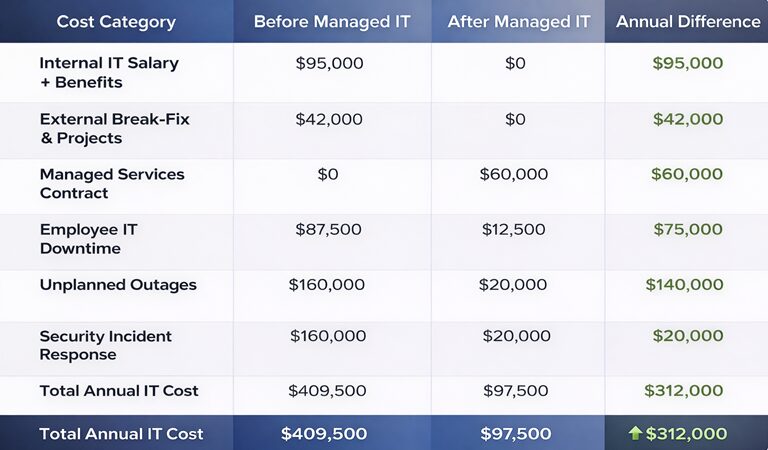
Note: Numbers are illustrative based on Chicago market rates and typical business impact. Actual figures vary by business size, industry, and service scope.
This calculation doesn’t include the softer benefits like reduced stress, faster technology implementation, better strategic alignment between IT and business goals.

Hiring an IT services company is about reclaiming capacity. The right partner transforms technology from a source of friction into a competitive advantage. They speak the language of business, not just servers and switches.
Ready to work with a team that treats your business like their own? SafePoint IT delivers strategic managed IT services, enterprise-grade security, and the consultative partnership your leadership team deserves. Contact our Chicago team to upgrade your IT department above the competition.
A managed IT services company handles your technology infrastructure for a flat monthly fee. This includes 24/7 monitoring, help desk support, cybersecurity, data backup, cloud management, and strategic planning.
Unlike break-fix providers who charge per incident, managed services proactively maintain systems to prevent problems before they occur.
One internal IT person provides limited coverage, so they’re unavailable when sick, on vacation, or after hours. In comparison, managed services give you a team with diverse expertise covering security, networking, cloud, and compliance.
Therefore, you get 24/7 coverage, broader skills, and often lower total cost than a single full-time employee plus benefits.
Businesses with 10 to 250 employees typically see the strongest ROI. For fewer than ten employees, basic support may suffice. Above 250, many organizations maintain internal IT teams but often use co-managed IT models.