

SafePoint IT Named to the 2026 Inc. 5000 List
SafePoint IT has been named to the 2026 Inc. 5000 list, the annual ranking of...
Your time is valuable, and sifting through IT providers who overpromise and underdeliver is a costly distraction. We’ll provide the insider perspective you need to find an MSP that actually serves your business.
We have translated years of real-world experience into actionable criteria. That’s from identifying red flags to understanding pricing models and future-proofing strategies. Whether you are evaluating your current provider or starting fresh, the insights here will save you money, prevent headaches, and help you build a technology partnership that drives real growth.

Before you pick up the phone, decide what your business actually needs from an IT provider. Every business is different. A boutique law firm with twenty employees has vastly different IT requirements than a manufacturing company with a warehouse full of IoT sensors.
One needs airtight data security and client confidentiality. The other needs a reliable network infrastructure and inventory management systems.
Before hiring IT support services for small businesses, ask yourself the following questions:
The most common mistake small business owners make is treating IT as a commodity, as if all providers offer the same thing. They don’t, and some specialize in certain industries while others excel at specific technologies.
Overall, understanding your starting point is the foundation upon which everything else is built.
Some providers wait for things to break, and others work to prevent breaks from happening in the first place. Reactive support involves calling when something goes wrong. Someone shows up and fixes the problem after the damage is done. The problem is that downtime doesn’t wait for appointments. Every hour your systems are offline is lost revenue, frustrated employees, and irritated customers.
Proactive support operates differently. A proactive provider monitors your systems constantly, identifies potential issues before they escalate, and handles maintenance on a schedule that doesn’t disrupt your work. They’re not waiting for the phone to ring, but watching your network like a hawk.
Here’s a table to help you compare the two approaches at a glance:
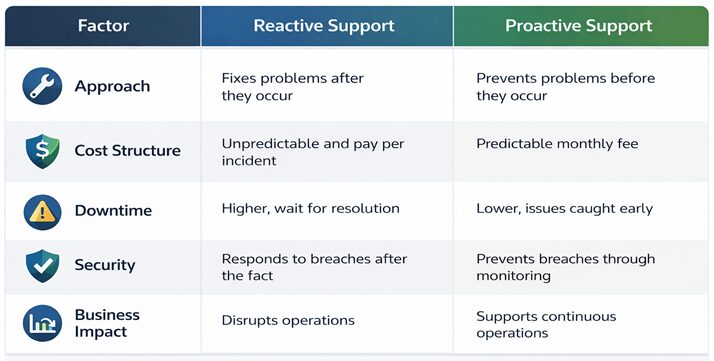
The reactive model made sense decades ago when technology was simpler. Today, with cyber threats evolving daily and businesses relying on cloud infrastructure, waiting for something to break is a gamble with increasingly bad odds.
When deployed correctly, technology is a force multiplier that drives revenue, improves efficiency, and gives you a competitive edge. But that only happens when your IT strategy aligns with your business objectives.
Here’s how the right IT support business partnership maps to real business outcomes:
One size does not fit all when it comes to IT support services for business models. The right fit depends on what resources you already have inside your organization.
Fully outsourced IT services mean your Managed Service Provider (MSP) functions as your entire IT department. They handle everything:
This model works best when you have no internal IT staff or when your current setup is stretched too thin to be effective.
Co-managed IT is a collaborative arrangement. You keep your internal IT team, whether that’s one person or several, and the MSP supplements their capabilities. Think of it as adding specialized expertise and additional bandwidth without the cost of full-time hires. Your internal team owns strategy and day-to-day decisions while the MSP handles overflow work, specialized projects, or coverage during vacations and after hours.
Here’s a table to help you compare the two IT support in business models at a glance:
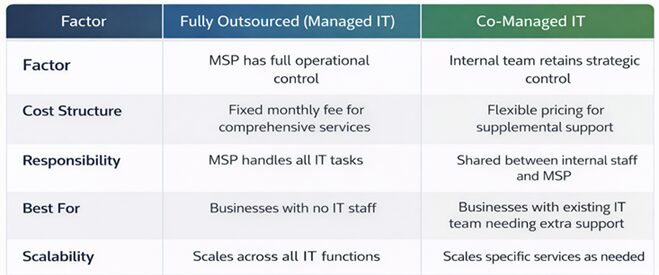
Small businesses need enterprise-grade reliability without enterprise-sized budgets or internal teams. The right MSP bridges that gap. But not every MSP understands how to serve businesses with lean operations, rapid growth cycles, and limited internal IT resources.
The ten traits below define the MSPs that deliver real value, each explained through the lens of what matters most to small business owners.
Small business owners don’t have time to decode technical specifications. An MSP that translates technology into business outcomes saves you from becoming an accidental IT manager.
When a provider explains how a solution reduces downtime, accelerates employee productivity, or protects your revenue, you can make informed decisions without needing a computer science degree.
This alignment ensures your technology investments directly support your business goals rather than becoming an underutilized asset. For a small business with limited staff, clear communication means you stay focused on running your company. Meanwhile, the MSP handles the technical complexities.
Small businesses rarely operate strictly 9-to-5. A retailer might process sales late into the evening. A healthcare practice could need weekend access to patient records. When your business runs outside traditional hours, your IT support must do the same.
An MSP that tells you exactly when the desk is staffed, who is on call after that, and what monitoring runs overnight ensures that a server failure at midnight doesn’t become a catastrophe by morning. For a lean operation without an internal night shift, this around-the-clock coverage provides peace of mind. It also protects your business from revenue loss during vulnerable off-hours.
Cash flow predictability is essential for small businesses. An MSP with transparent and all‑inclusive pricing eliminates the fear of surprise invoices that strain your budget. When you know exactly what you’ll pay each month, whether per user or per device, you can plan confidently.
This pricing model also prevents routine tasks, such as onboarding new employees or after‑hours support, from generating separate charges. In addition, a strong MSP will proactively audit recurring licenses, services, and infrastructure costs to identify areas where businesses may be overpaying for tools they no longer need or are not fully using. For a small business operating on tight margins, predictable pricing combined with ongoing cost reviews turns IT from a variable expense into a manageable, optimized operational line item.

Small businesses are frequent targets of cyberattacks precisely because they often lack strong defenses. An MSP that builds security into every service closes that vulnerability gap.
When security is foundational, you benefit from continuous monitoring, enforced multi-factor authentication, and regular employee training. That’s without needing to negotiate each component separately.
This proactive stance dramatically reduces your risk of a breach that could cripple operations, damage client trust, or incur recovery costs that small businesses struggle to absorb.
An MSP that primarily serves enterprise clients may not understand the constraints and realities of small business operations. However, providers with experience in your segment understand limited budgets, the need for flexible contracts, and the importance of personalized attention.
They know that a two-person accounting firm has different needs than a hundred-person manufacturing plant. By choosing an MSP with a track record among similar businesses, you gain a partner who already speaks your language and can deliver solutions scaled appropriately.
For small businesses, where every staff hour counts, automation translates directly into faster resolutions, fewer disruptions, and more predictable operations. Here is how an MSP provider can help:
Growth is the goal for most small businesses, but it also strains technology infrastructure. An MSP that designs scalable solutions ensures your IT can expand without disruption.
Whether you add five employees or open a second location, a scalable provider adds users, devices, and services. This flexibility means you never outgrow your IT support, and you never pay for capacity you don’t yet need. For a small business poised for expansion, scalable IT support removes a common growth bottleneck.
Small businesses cannot afford ambiguity when systems go down. A well-defined Service Level Agreement sets clear expectations for response times, resolution targets, and escalation procedures. This clarity allows you to hold your MSP accountable and plan around potential outages.
When an SLA is documented and honored, you gain operational certainty. That means you know exactly how quickly critical issues will be addressed. For a small business without internal IT backup, this certainty is invaluable. That’s because it transforms IT support from a gamble into a reliable utility.
Reactive IT support means you pay for problems after they disrupt your business. Proactive support identifies and resolves issues before they cause downtime. An MSP that monitors your systems continuously:
For a small business, where every hour of downtime directly impacts revenue and reputation, proactive support is not a luxury. It’s a competitive advantage that keeps operations running smoothly.
The quality of your IT support ultimately depends on the MSP’s internal standards. Providers who invest in technician training, low turnover, and modern management tools deliver faster resolutions and more consistent service.
When an MSP prioritizes their own infrastructure and team development, they are better equipped to support yours. For a small business relying on that support, this investment translates into fewer recurring issues, shorter resolution times, and a partner who continuously improves rather than stagnates.
Your MSP doesn’t need to be the biggest, but they must be competent where it matters most. Here’s what to evaluate in three critical areas.
Cloud services have transformed how small businesses operate. Instead of maintaining expensive on-premise servers, you can access computing power, storage, and applications from anywhere. But moving to the cloud requires expertise, and doing it wrong creates more problems than it solves.
A competent MSP helps you determine which workloads belong in the cloud and which should stay local. They understand the major platforms (Microsoft Azure, AWS, Google Cloud ) and can guide you toward the right fit for your specific needs.
They also handle the migration process, ensuring data transfers happen securely and with minimal disruption. Beyond migration, cloud expertise means ongoing management. The provider should monitor usage to optimize costs, manage user access permissions, and implement backup strategies specific to cloud environments.
Cybersecurity isn’t a product you buy, but an ongoing practice. The right MSP builds security into everything they do rather than treating it as a separate service you pay extra for. The following capabilities separate genuine security partners from those treating protection as an afterthought:
Infrastructure is the foundation that everything else sits on, such as your network, servers, and connectivity. When infrastructure fails, everything fails.
A provider with strong infrastructure expertise designs systems for reliability and redundancy. They understand that a single point of failure, one switch that can take down an entire office, is unacceptable. They plan for outages and build systems that keep you operational even when things break.
This expertise extends to hardware lifecycle management. They know when equipment needs replacement, when warranties expire, and how to phase in new technology without disruption. They also understand the difference between what you need and what the sales brochure says is the latest and greatest.
Furthermore, network infrastructure requires particular attention for small businesses. Whether you have a physical office or a fully remote team, your network must support the applications you rely on. A good MSP audits your network, identifies bottlenecks, and recommends improvements that actually matter.

You need to understand what you’re paying for to make an informed decision on the best business tech help for your company.
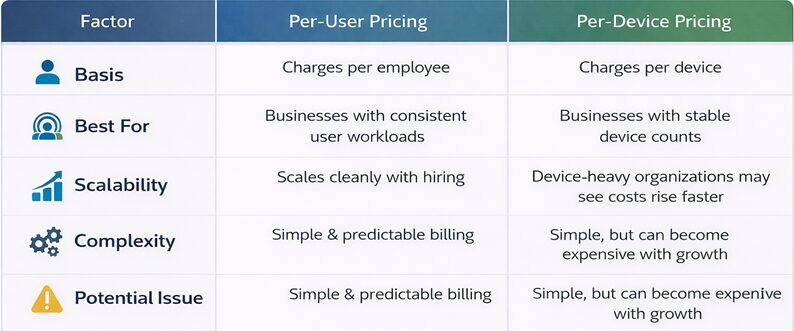
The two most common pricing models in managed IT are per-user and per-device. Each has advantages, and neither is inherently better, so it depends on your business.
Per-user pricing charges a flat monthly fee for each employee, regardless of how many devices they use. If an employee has a laptop, a desktop, and a phone, they count as one user. This model aligns with headcount growth and makes budgeting simple as you hire.
Per-device pricing charges for each piece of equipment, which refers to workstations, laptops, servers, and network hardware. This model works well when your environment is stable, and you have a clear sense of your hardware footprint. But costs can escalate quickly if you add devices without adding users.
Here is a table to help you better understand the differences between the two pricing models:
Start with downtime since every hour your systems are offline, you lose revenue. Then, calculate your average hourly revenue and multiply by hours of downtime prevented. A proactive MSP reduces downtime by catching issues before they escalate.
Next, consider employee productivity. When employees waste time dealing with slow computers, login issues, or broken applications, that time comes out of productive work. Multiply those wasted hours by hourly wages, and the cost adds up quickly.
Security incidents carry their own costs. The average small business hit by ransomware faces recovery costs well into five figures. That’s before considering lost business and reputational damage. A good MSP prevents these incidents, which translates directly to avoided losses.
Hardware and software costs also factor in. MSPs often have vendor relationships that reduce the cost of equipment and software. They also help you avoid buying things you don’t need.
The formula looks something like this:
IT ROI = (Cost Savings from Reduced Downtime + Productivity Gains + Avoided Security Incident Costs + Hardware/Software Savings) - MSP Fees
When you calculate properly, good IT support pays for itself.
Even with transparent providers, certain costs can sneak up on you. Here’s what to watch for:
Chicago businesses face unique challenges. The city’s diverse economy spans finance, manufacturing, healthcare, logistics, and technology. You’ll find that each has distinct IT requirements. A local IT services company that understands this landscape brings immediate value.
Chicago also has specific compliance considerations. If you serve clients in healthcare, legal, or financial services, your IT provider must understand Illinois regulations alongside federal requirements. Local providers have navigated these waters before.
The city’s infrastructure matters, too. Chicago experiences extreme weather that can impact network equipment, power systems, and internet connectivity. Local providers know how to design systems that withstand these conditions.
Beyond technical considerations, local providers understand the business environment. They know the local vendors, the regional internet providers, and the city’s unique commercial real estate landscape. This local knowledge translates to faster problem-solving and better recommendations.

Even a polished sales pitch can hide underlying problems. Knowing the warning signs early saves you from costly contracts, operational headaches, and security gaps. If you encounter any of these red flags during your search, consider it a clear signal to keep looking.
A provider who cannot show you patching reports, backup verification logs, or ticket response metrics is hiding something. Professional MSPs track everything and share that data willingly.
If they become defensive or claim they “don’t keep those numbers,” they lack the accountability you need. Without measurable performance, you have no way to hold them responsible.
If the conversation centers on firewalls, servers, and software versions rather than your business goals, you are talking to a vendor instead of a partner. The right provider leads with questions about your challenges and translates technology into results.
Overall, feature-heavy pitches often mask a lack of understanding about what actually drives value for small businesses.
Unlimited support sounds reassuring until you realize it means nothing without parameters. You need to ask questions such as:
Best managed IT services that refuse to define unlimited in writing are leaving room to charge you later for services you assumed were covered.
Security is not optional. If a provider offers a basic package without endpoint protection, multi-factor authentication, or monitoring, they are not taking your protection seriously. Reputable MSPs bake security into every engagement from day one.
When the first technician cannot solve your problem, who takes over? A provider without a documented escalation path leaves you stranded during critical outages.
Ideally, ask for their escalation procedure in writing. Vague answers or promises to “figure it out” signal disorganization that will cost you when you need them most.
Any provider can dig up a happy client from five years ago. Current references matter, so ask to speak with businesses similar to yours that have been clients for at least six months. If they hesitate or only offer names you suspect are hand-picked, they may be concealing consistent service issues.
An IT provider who starts talking solutions before understanding your operations, growth plans, or pain points is guessing.
The right MSP asks probing questions about your workflows, compliance needs, and budget. If they are not curious about your business, they will not be able to serve it effectively.
For example, if you have a nonprofit operation, then nonprofit IT services would ask relevant questions. This gives you peace of mind that they understand the unique challenges of your IT department.
A successful IT partnership isn’t static, but it evolves as your business grows and your needs change.
The first 90 days set the tone for your entire relationship. A competent MSP uses this period to:
Days 1-30: Expect heavy documentation. The provider should inventory your hardware, map your network, document your software licenses, and identify your critical applications. They should also conduct a security assessment to identify immediate vulnerabilities.
Days 31-60: This period typically involves stabilization. The provider addresses any urgent issues discovered during assessment, patches outdated systems, and implements basic security controls. They should also establish regular communication rhythms. For example, weekly check-ins, monthly reports, and quarterly reviews.
Days 61-90: The final thirty days focus on planning. By now, the provider understands your business well enough to propose strategic improvements. Therefore, expect a roadmap outlining recommendations for the next six to twelve months, prioritized by business impact.
Throughout this period, responsiveness matters. The provider should answer questions promptly, communicate clearly, and demonstrate that they’re learning your business.
The best IT relationships become true partnerships where both parties work toward shared goals. A true partnership starts with transparency. Your provider shares data about your systems, explains their recommendations, and owns their mistakes. You share your business goals, your budget constraints, and your concerns.
Communication is the backbone of partnership. Regular meetings should go beyond ticket counts to discuss business outcomes. What’s working? What’s not? Where should technology take you next?
Mutual respect matters, too. Your provider respects your time, your budget, and your expertise in your business. You respect their technical judgment and trust their recommendations.
Finally, accountability separates partnerships from transactions. A true partner owns outcomes, not just tasks. When something goes wrong, they don’t point fingers but fix and learn from it.
The following capabilities ensure your business remains competitive, secure, and scalable in the years ahead.

Finding the right IT support isn’t about checking boxes or comparing price lists. It’s about finding a partner who understands your business, communicates clearly, and delivers consistent value.
If you’re ready to find that partner, SafePoint IT delivers the proactive, strategic support that Chicago small businesses deserve. From 24/7 monitoring to strategic IT consulting, we become the technology partner who helps you work smarter, grow faster, and stay secure.
Contact SafePoint IT today to schedule a consultation and see how the right IT support can help reduce friction, strengthen operations, and support your business goals.
Most MSPs charge $25-$200+ per user per month, depending on the services included. Lower-cost plans may cover basic support, while more comprehensive packages often include help desk support, cybersecurity, monitoring, compliance support, and strategic planning.
Costs will vary based on industry requirements, security needs, and the number of devices.
Ask about their monitoring capabilities, backup testing procedures, security protocols, response times, and how they measure success. Furthermore, request client references and ask to see evidence of their performance across their entire client base.
If you have no internal IT staff, fully outsourced is usually best. If you have an internal team but need specialized expertise or overflow support, co-managed IT adds capabilities without replacing existing staff.
Response times vary by urgency. Critical issues affecting multiple users should receive a response within 1 to 4 hours. Non-urgent requests might take 24 to 48 hours.
Your Service Level Agreement (SLA) should specify these commitments clearly.
Yes, reputable MSPs understand regulations like HIPAA, GDPR, and Illinois-specific requirements. They implement controls, maintain documentation, and often conduct regular audits to help you maintain compliance.
Your data belongs to you. A professional MSP will coordinate the transition with your new provider, transferring all necessary data and configurations. Ensure your contract includes provisions for data export and transition support.