
Most people have done this a hundred times. You type your password into Outlook, your phone buzzes, and you copy a six digit code out of a text message. That step is going away.
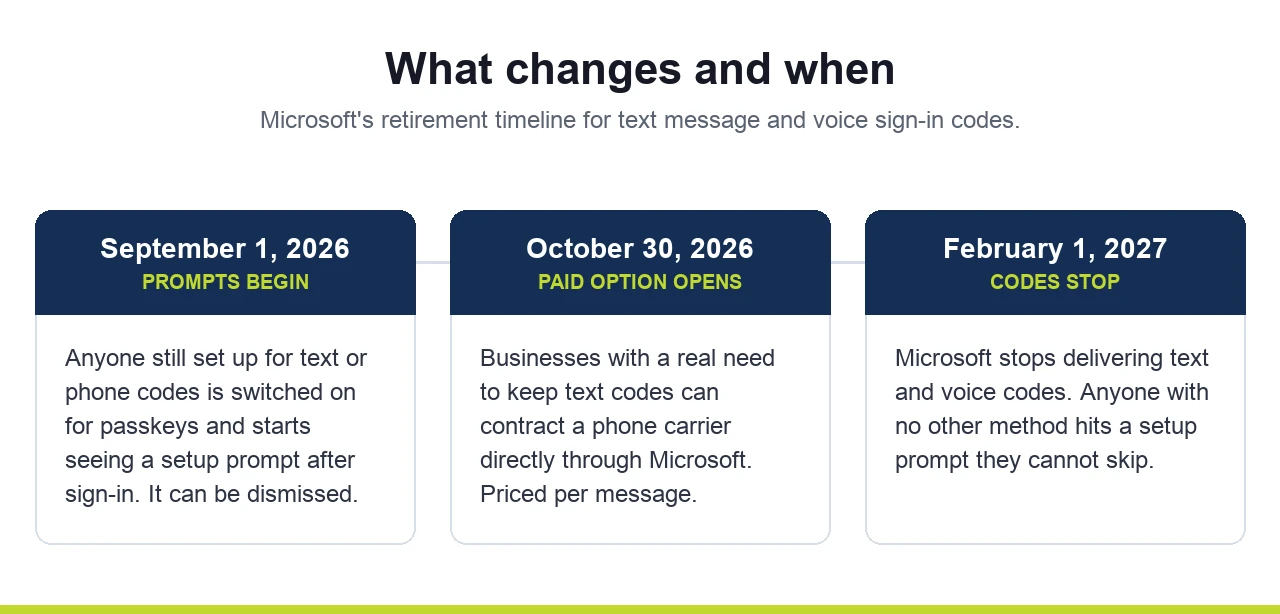
Microsoft announced in July 2026 that it is retiring text message and phone call sign-in codes for Microsoft 365 business accounts. The date is February 1, 2027. There is no way to turn it off and no way to delay it past that date.
Here is what it means, in plain English.
What is being turned off, and what is not
Microsoft is not turning off multi-factor authentication. It is turning off one way of doing it.
Right now, when that code arrives, Microsoft is paying a phone carrier behind the scenes to deliver the text. That delivery is what ends. Text codes and automated phone calls will stop coming from Microsoft.
Everything else stays. The Microsoft Authenticator app keeps working, both the approve-this-sign-in pop-up and the rotating code inside the app. Hardware security keys keep working. Windows Hello, the fingerprint or face or PIN people use to sign in to a work laptop, keeps working.
If your staff already uses the app, the day-to-day does not change.
Why Microsoft is doing it
Text codes are the weakest form of multi-factor authentication in common use, and it is not close.
There are two problems. The first is SIM swapping. Someone calls your phone carrier, talks their way into moving your number to a phone they control, and your codes start arriving on their screen. The weak point is not your phone. It is a support rep at the carrier being talked into something.
The second problem is more common and worse. A fake login page asks for your password, then asks for the text code, and quietly passes both to the real Microsoft site while you watch it spin. You did nothing careless. You typed a code into a website, which is exactly what the code is for. A number you can read and type is a number you can be tricked into handing over.
Microsoft's word for the fix is phishing resistant. It means a method where there is nothing for you to read out loud, type in, or forward to anyone. If you want the background on why any of this matters, we covered the basics in why multi-factor authentication matters for business security.
What a passkey is
The replacement Microsoft is pushing is called a passkey, and the name is worse than the thing.
A passkey is a key that lives on your device and is released by your fingerprint, your face, or your device PIN. The key itself never leaves the device and never gets shown to you. When you sign in, your laptop or phone proves who you are directly to Microsoft. There is no number on the screen. A fake website cannot ask you for a passkey the way it asks for a code, because there is nothing to hand over.
In practice it is faster than what most people do today. Touch the fingerprint reader and you are in.
There are two flavors, and the difference matters more than it sounds.
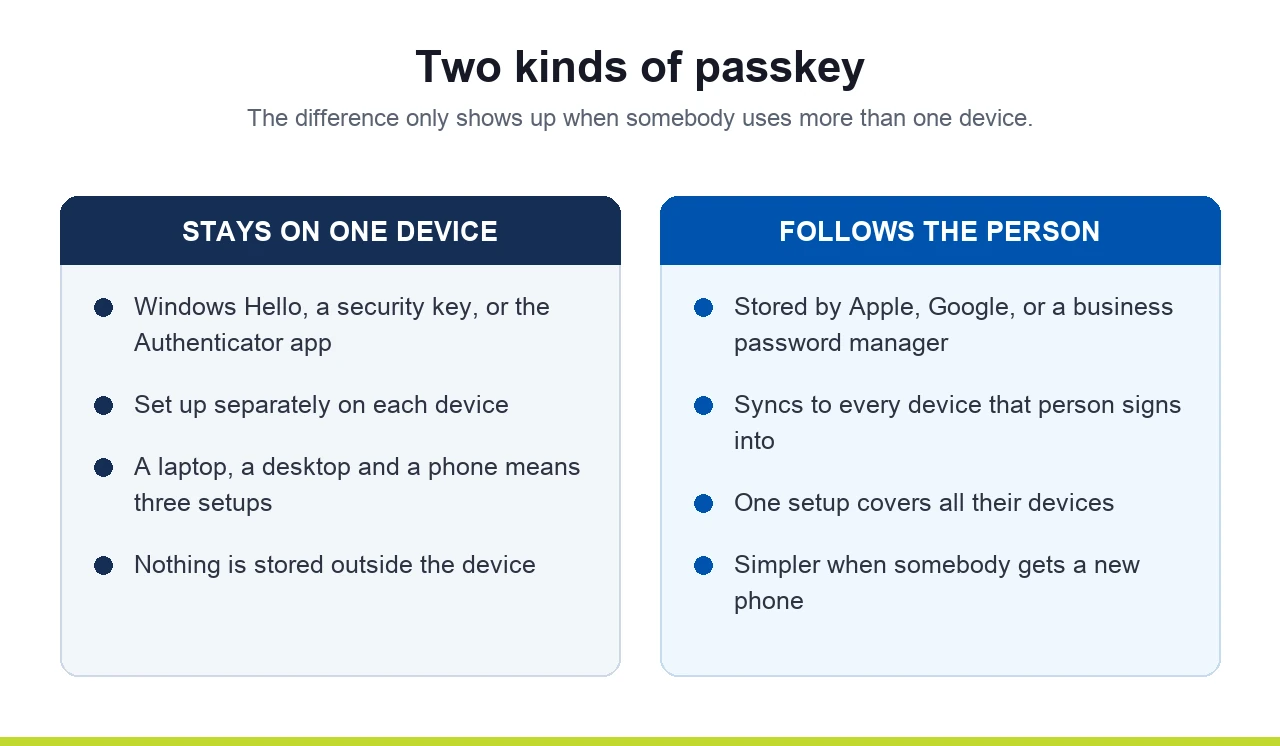
Some passkeys live on one device only. A fingerprint passkey set up on a work laptop stays on that laptop. If the same person also signs in from a desktop at home and a phone, that is three separate setups.
Other passkeys follow the person. They are stored in an account or a password manager and sync to every device that person signs into. Apple and Google both do this for their own devices, and a business password manager does it across Windows, Mac, iPhone, and Android together.
Neither approach is wrong. But an office with a mix of Windows desktops, MacBooks, and personal phones will feel the difference on setup day.
Two catches for companies already on the app
Most businesses that took multi-factor authentication seriously moved to the app years ago. If that is you, you are in good shape. Two things will still land on your desk.
The first is a wording problem that is going to surprise people. Starting September 1, 2026, Microsoft begins nudging users to set up a passkey. The nudge does not go to people who use text codes. It goes to people whose account is allowed to use them. Plenty of companies switched that setting on years ago and never switched it back off, even after the whole staff moved to the app. Those users will start seeing a pop-up after they sign in. It can be dismissed as many times as they like. It is still a pop-up your staff is going to ask about.
The second catch is the one that matters.
The backup method is what people will miss
Ask how somebody signs in and you hear about the app. Ask what happens when they get a new phone and the answer is usually the text message.
Text was almost never the main method. It was the fallback. New phone, lost phone, app deleted by accident, someone locked out on a Sunday afternoon. The text code was the way back in.
The retirement covers that too, including password resets. If your company lets people reset their own password by receiving a text, that stops on the same date.
So the question worth asking is not how everyone signs in. It is what happens the morning somebody walks in with a new phone. If the honest answer is that they get a text, there is something to fix.
The fix is not complicated. Every person should have two methods registered, and neither one should be a text message.
If your business still needs text messages
Some businesses will have a real reason to keep them. A compliance rule that names SMS specifically, or staff who cannot install an app on the phone they carry.
That door stays open, just not for free. Starting October 30, 2026, a company can contract with a phone carrier directly through Microsoft and keep sending text codes. You pick the carrier, you pay per message, and Microsoft is out of the middle. Pricing depends on the carrier and the region.
For most small and mid sized businesses this will not be worth the trouble. It is still worth knowing it exists, because somebody will eventually tell you passkeys are the only option, and that is not true.
Where to start
February 2027 sounds far off. September 2026 is not, and that is when your staff starts seeing pop-ups.
Three things are worth doing this fall.
- Find out who is affected. Microsoft published a free script that lists every account still set up for text or phone codes. Companies get surprised in both directions. Some find almost nobody. Some find the setting was left on for the entire company.
- Make sure nobody has only one way in. That is the step that prevents lockouts.
- Tell people before the pop-up appears. A prompt asking someone to set up a new sign-in method looks exactly like a scam, and you have spent years training your staff to treat it like one. A short heads up in the fall beats twenty helpdesk tickets in September.
One more thing worth checking while you are in there. Microsoft deprecated the older multi-factor authentication and password reset settings on September 30, 2025, and a lot of businesses never finished moving to the newer unified policy. If that migration is still sitting unfinished, it needs to be sorted out first, because that is where your text message settings live.
Final thoughts
None of this is an emergency. It is a deadline, and deadlines are easy when you see them coming a year and a half out.
Text codes were never very good. Everybody in security knew it. Microsoft finally set a date. Companies that already moved to the app did most of the work years ago, and what is left for them is the boring part, which is making sure the backup plan does not quietly depend on a text message.
If you want a hand working out where your business stands before the September nudges start, get in touch with SafePoint IT and we will take a look with you.
Sources: Passkeys by default and retirement of Microsoft-provided SMS and voice authentication and the retirement FAQ on Microsoft Learn, plus the Microsoft Security Blog announcement.
Frequently Asked Questions
Will my staff be locked out of email on February 1, 2027?
Is the Microsoft Authenticator app going away too?
Does this affect self-service password reset?
Can we keep using text messages if we really need them?
Do we need a password manager to use passkeys?
What should we do first?

Managed IT, cybersecurity and AI for Chicagoland businesses of 10 to 100 people since 2002. Inc. 5000 in 2023, 2025 and 2026. How we work →