

SafePoint IT Named to the 2026 Inc. 5000 List
SafePoint IT has been named to the 2026 Inc. 5000 list, the annual ranking of...
If your business runs on Claude, ChatGPT, or any other AI assistant at scale, you've probably noticed the costs add up faster than expected. Maybe you're hitting usage limits sooner than you used to. Maybe the API bill crept up without anyone changing how they work.
There's a lot of advice floating around about how to fix this, and a fair amount of it is wrong. One piece in particular makes the rounds constantly: the claim that every time you correct an AI ("make it shorter," "change the tone"), it re-reads your entire conversation from scratch and bills you for all of it again, so a long back-and-forth supposedly costs the compounding sum of every message.
It's a tidy story. It's also mostly incorrect, and the reason it's wrong points at what actually drives your costs. Here's the accurate version, and the habits that genuinely move the needle on AI cost management.
The reason "every correction re-bills the whole conversation" is wrong is a feature called prompt caching.
When you send a message, the AI does process the context that came before it. But it doesn't pay full price to re-read content it has already seen. Modern AI platforms cache the encoded state of the conversation, and subsequent messages read from that cache at a steep discount instead of reprocessing everything at full cost.
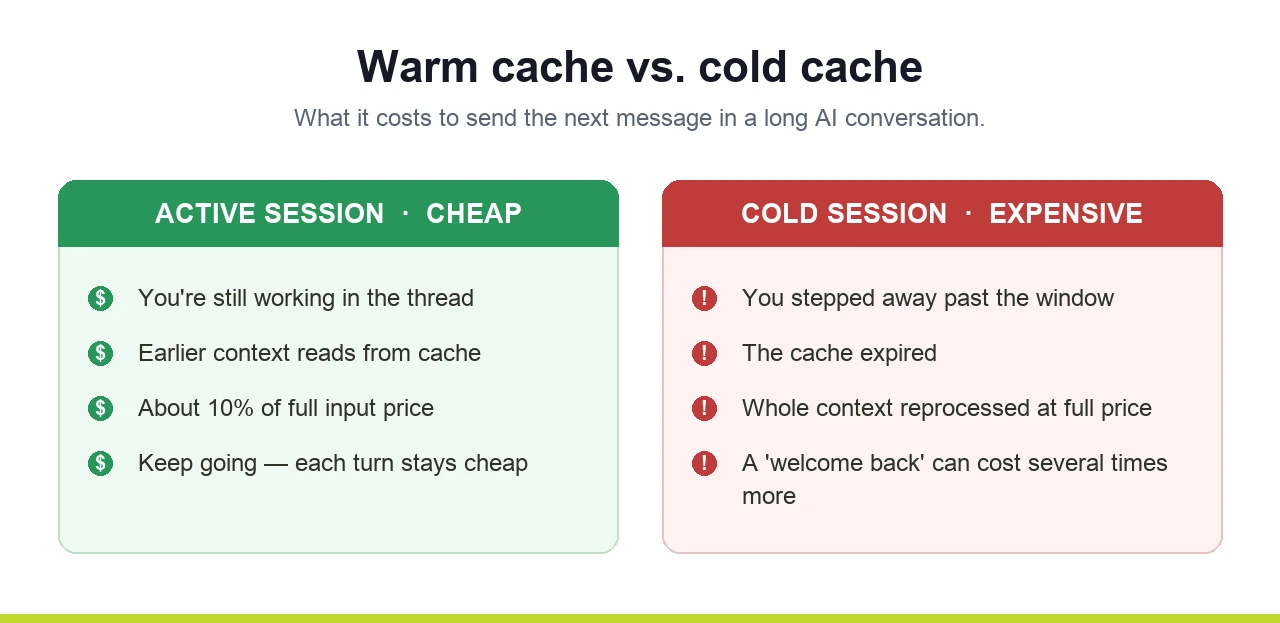
On Anthropic's Claude API, the numbers are public: a cache read costs about 10% of the normal input price. So that earlier context isn't free on every turn, but it's roughly a tenth of what the scary version assumes. Sending one more correction message is not the catastrophic token-burner it gets made out to be.
This matters because if you optimize for the wrong thing (obsessively editing prior messages instead of replying, say) you spend effort fighting a problem that caching already mostly solved, while the real cost drivers go untouched.
Here's the part worth understanding, because it's where real money leaks.
That cache doesn't last forever. It has a time-to-live, and the clock resets every time the cached content is used. As long as you're actively working in a session, each message keeps the cache warm and you keep paying the discounted rate.
Step away for longer than the cache window, though, and it expires. Your next message can't read from cache, so the platform reprocesses the whole context at full price as a fresh write, which actually costs more than normal input. That single "welcome back" message after a long lunch can cost several times what it would have mid-session.
How long is the window? This is where it gets slippery, and where you should be careful with anything you read online. The default lifetime on Claude's API is short (on the order of a few minutes), and a longer one-hour option exists at extra cost. The exact defaults have shifted over time and can differ between the consumer apps, the API, and tools like Claude Code, so the specific number someone quotes in a forum may be stale or may not apply to your plan. The principle is what's durable: an active session is cheap, and a cold session you return to hours later is expensive.
The practical takeaway: if you're stepping away from a long, valuable session, don't just leave it open and wander back tomorrow expecting to pick up cheaply. Either finish the thread, or capture where you left off and start fresh when you return.
Strip away the myths and here's what actually works, roughly in order of impact.
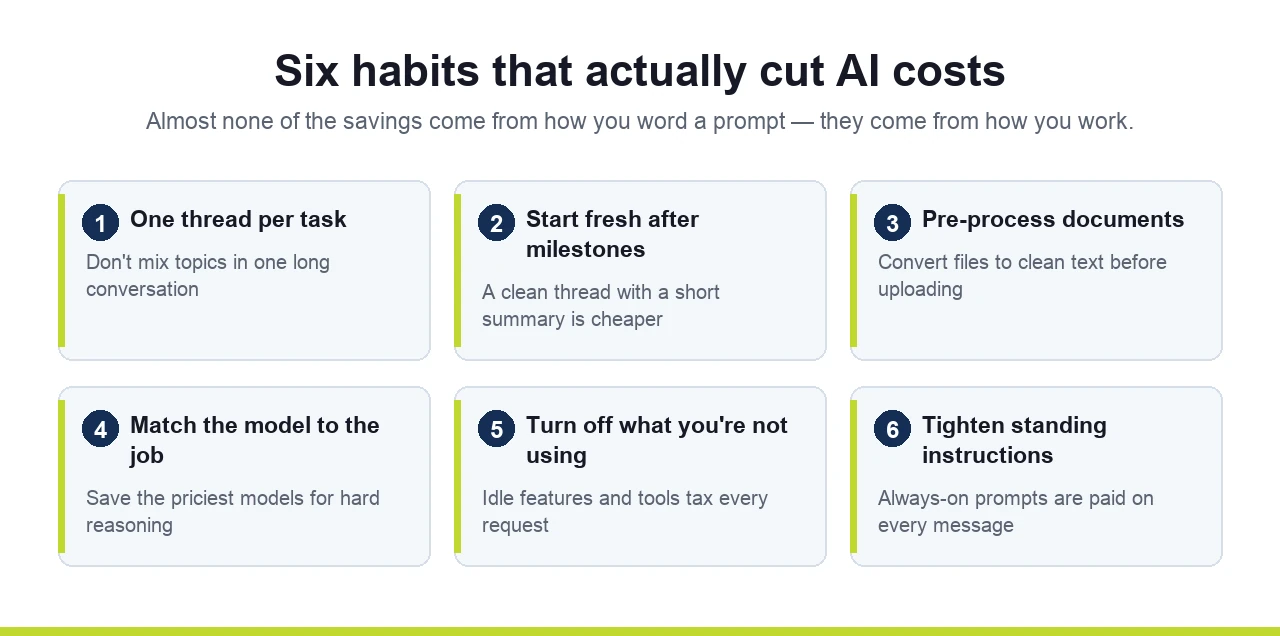
One thread per focused task. This is the big one. When you switch topics in the middle of a long conversation, everything you discussed earlier still rides along in the context of every new message. Brainstorm a budget, then pivot to a hiring question in the same thread, and the hiring questions are dragging the entire budget discussion behind them. Separate tasks belong in separate conversations.
Start fresh after major milestones, even on the same topic. A long conversation accumulates a lot of now-irrelevant back-and-forth. Once you've finished a chunk of work, a clean conversation (seeded with a short summary of what matters) is cheaper and usually produces sharper output, because the model isn't wading through everything that came before.
Pre-process documents instead of dumping raw files. Large PDFs and Word files carry a lot of overhead. Converting them to clean, structured text (Markdown is ideal) before handing them to the AI reduces what it has to chew through and improves how well it understands the content. For the conversion itself, use a normal file converter where you can; you don't need AI for the mechanical part.
Match the model to the job. You don't need the most powerful, most expensive model for every task. Routine summarization, formatting, and simple drafting run fine on lighter, cheaper models. Reserve the heavyweight models for genuinely hard reasoning. Picking the right tier per task is one of the easiest wins available.
Turn off what you're not using. Features like extended reasoning, or integrations and tools left connected in the background, can quietly add to every request even when the current task doesn't need them. Keep the setup lean.
Be deliberate about your standing instructions. If you use custom instructions or system prompts that load on every single message, keep them tight. A bloated set of always-on instructions is a tax you pay on every interaction, most of it irrelevant to any given request.
Notice the pattern: almost none of the real savings come from how you phrase an individual prompt. They come from how you manage sessions, files, and setup. Most teams burn their budget on overhead and structure, not on the actual work.
For one person experimenting, this is a curiosity. Across a team, it's a line item, and an avoidable one.

When a whole company adopts AI tools without any shared discipline, the waste compounds: everyone leaving sprawling multi-topic threads open, dumping raw files, defaulting to the priciest model for trivial tasks, returning to cold sessions all day long. None of it is visible on any one person's screen. It just shows up as a bill that's bigger than it should be, and usage limits that bite sooner than expected.
The fix isn't a clever prompt. It's a small set of habits — real AI cost management — applied consistently, and ideally a little governance around how your team uses these tools in the first place. That's the same conversation behind a question a lot of leaders are already asking, and one that often surfaces alongside the common mistakes teams make after launching AI tools: who's using which AI tools, for what, at what cost, and with what data going into them?
Helping businesses adopt AI deliberately, rather than as a scattered set of individual experiments, is part of what we do. That means the practical efficiency habits above, but also the bigger picture: which tools your team should be on, how to keep costs and data under control, and how to actually get useful work out of these systems instead of just a bill.
If your AI costs have been climbing and nobody's quite sure why, or you'd just like a straight read on whether your team is using these tools well, that's worth a conversation. A 15-minute call is the fastest way to get a clear answer. No jargon, no pressure.
It also connects to the broader work of running AI safely inside a business, from tool access to data protection, which sits at the center of our managed IT and cybersecurity practice.