

SafePoint IT Named to the 2026 Inc. 5000 List
SafePoint IT has been named to the 2026 Inc. 5000 list, the annual ranking of...
Here's a question most owners can't answer off the top of their head: how many people are you paying Microsoft for, and how many of them still work for you?
When we look at a new client's Microsoft 365 tenant, the numbers rarely match. People leave, their accounts get blocked, and the license keeps billing every month. Nobody notices because it's one line on a Microsoft invoice that already looks complicated.
It's a small leak per seat. Over a year, across every subscription your company pays for, it adds up to real money.
The same patterns show up again and again in companies with 20 to 100 employees:
None of these companies were careless. They just never had a process that connected "this person left" to "stop paying for them."
Microsoft raised commercial prices on July 1, 2026. Business Basic went from $6 to $7 per user per month and Business Standard from $12.50 to $14 on annual plans. Business Premium held flat. Existing customers don't see the new price until their first renewal after July 1, which means many businesses are about to feel it on their next bill. (We covered the announcement in Microsoft 365 pricing changes in 2026.)
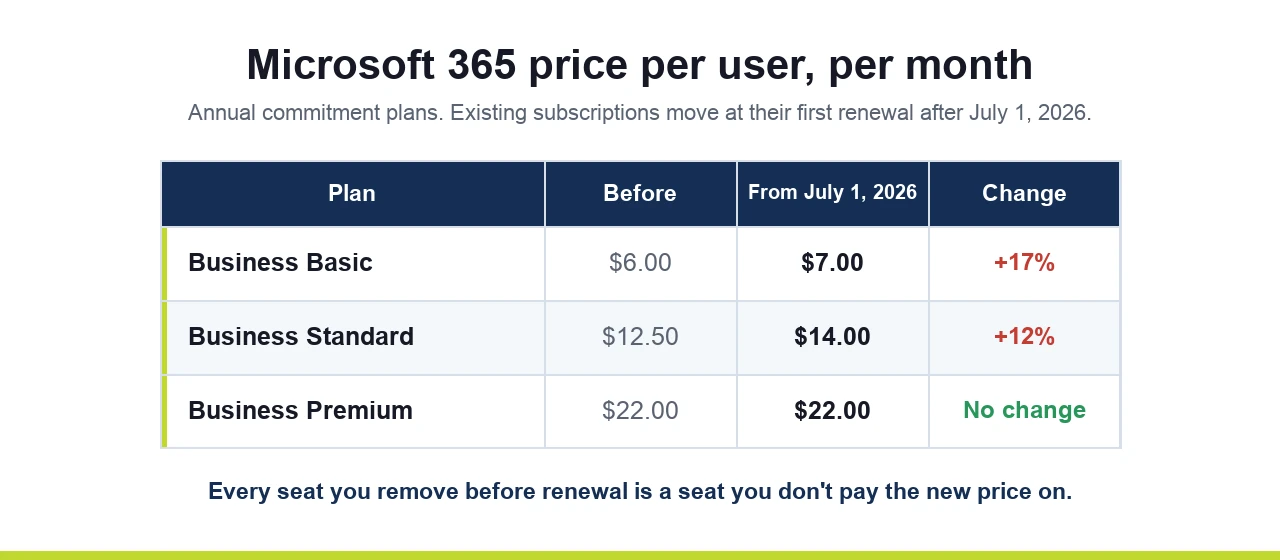
That makes renewal the right moment to audit. Every seat you remove before renewal is a seat you don't pay the higher price on for the next year.
And unused licenses aren't only a cost. An account that still works after someone leaves is a door into your company that nobody is watching. Old accounts are a common starting point for the attacks in our article on MFA bypass.
You don't need special software for a first pass. You need about an hour and an honest staff list.
1. Export your user list. In the Microsoft 365 admin center, export active users with their assigned licenses. Note which accounts are blocked from signing in but still have a license attached. Those are the easy wins.
2. Compare it to payroll. Line it up against your current employee list. Every licensed account should map to a current person or a clear business purpose.
3. Look at last sign-in dates. Accounts with no sign-in for 60 or 90 days deserve a question. Some will be legitimate (seasonal staff, an owner who only uses the phone app), and some will be people who left.
4. Check the license type, not just the count. Someone who only needs email may not need a full Business Standard or Premium seat. Shared inboxes like info@ or billing@ usually don't need a license at all.
5. Don't stop at Microsoft. Run the same check on your phone system, Zoom, Adobe, your accounting software, your CRM and any industry software billed per user. These are often billed on a separate card and reviewed even less.
This is where people get nervous, and for good reason. Deleting an account too fast can take email and files with it. Here's the safer order:
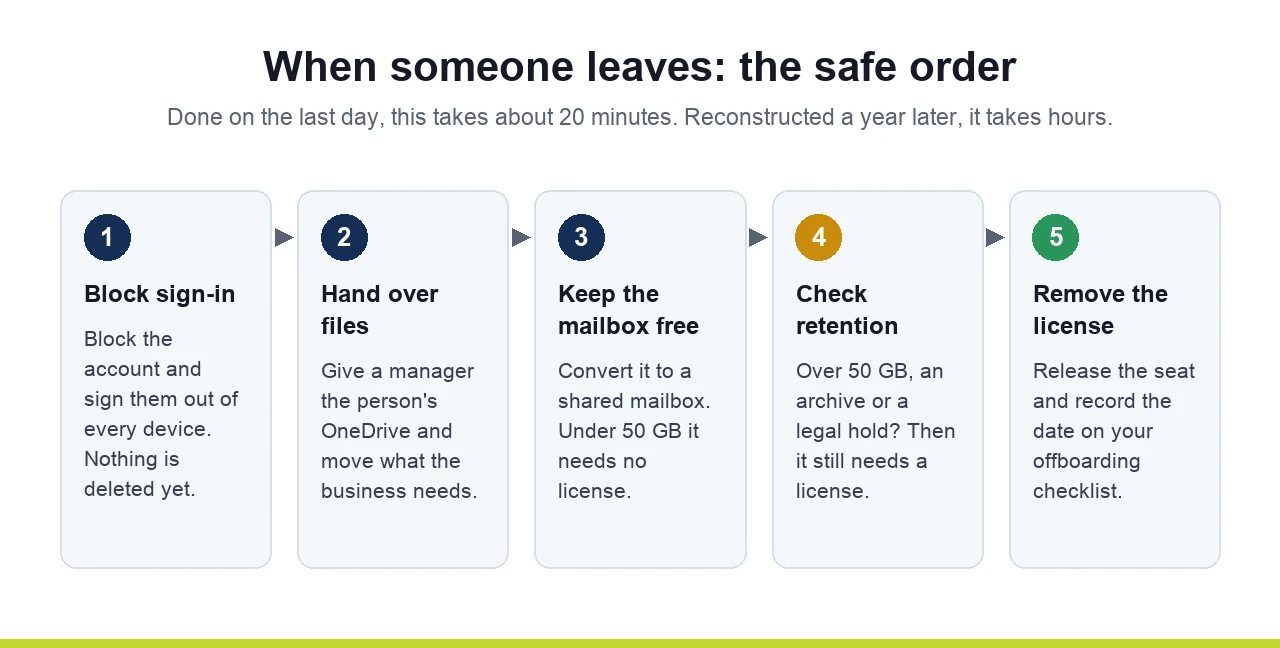
The whole thing takes 20 minutes per person when it's done the day someone leaves, and several hours when someone tries to reconstruct it a year later.
A one-time cleanup feels good and then quietly drifts back. What keeps it clean:
For our managed clients, license cleanup is part of offboarding: when you tell us someone is leaving, we block the account, hand their files to the right person, convert the mailbox and release the license. We also review license counts against your user list during our regular business reviews, so seats don't pile up between renewals. You can read more about our offboarding process.
If you'd like to know how many of your Microsoft 365 licenses are going to people who no longer work for you, book a 15-minute call with our team. It's usually a quick answer.
Tell us a little about your business and we will get you booked in.