

SafePoint IT Named to the 2026 Inc. 5000 List
SafePoint IT has been named to the 2026 Inc. 5000 list, the annual ranking of...
A business owner turns on multi-factor authentication (MFA), checks the box on the cyber insurance form, and moves on. A few months later, someone in accounting gets an email from a vendor's real address asking to update banking details. The vendor's mailbox was taken over. So was one of yours.
"But we have MFA" is the most common thing we hear after a breach. MFA was on. The attacker got in anyway.
MFA is still one of the best things you can do for your business. It stops the large majority of password attacks cold. But attackers have adapted, and the ones targeting small and mid-sized businesses now go around MFA instead of through it. Here's how they do it, and what closes each gap.
MFA protects the moment you sign in. It checks that the person typing your password also has your phone. Once that check passes, Microsoft 365 hands your browser a session token, a digital pass that says "this person already proved who they are." That pass is what keeps you signed in for days without prompting you again.
Attackers figured out that they don't need your password or your phone. They need that pass.
Across the businesses we support, identity alerts (suspicious sign-ins, stolen sessions, unexpected changes to how someone signs in) nearly tripled from August to September of this year. Almost every one involved an account that had MFA turned on.
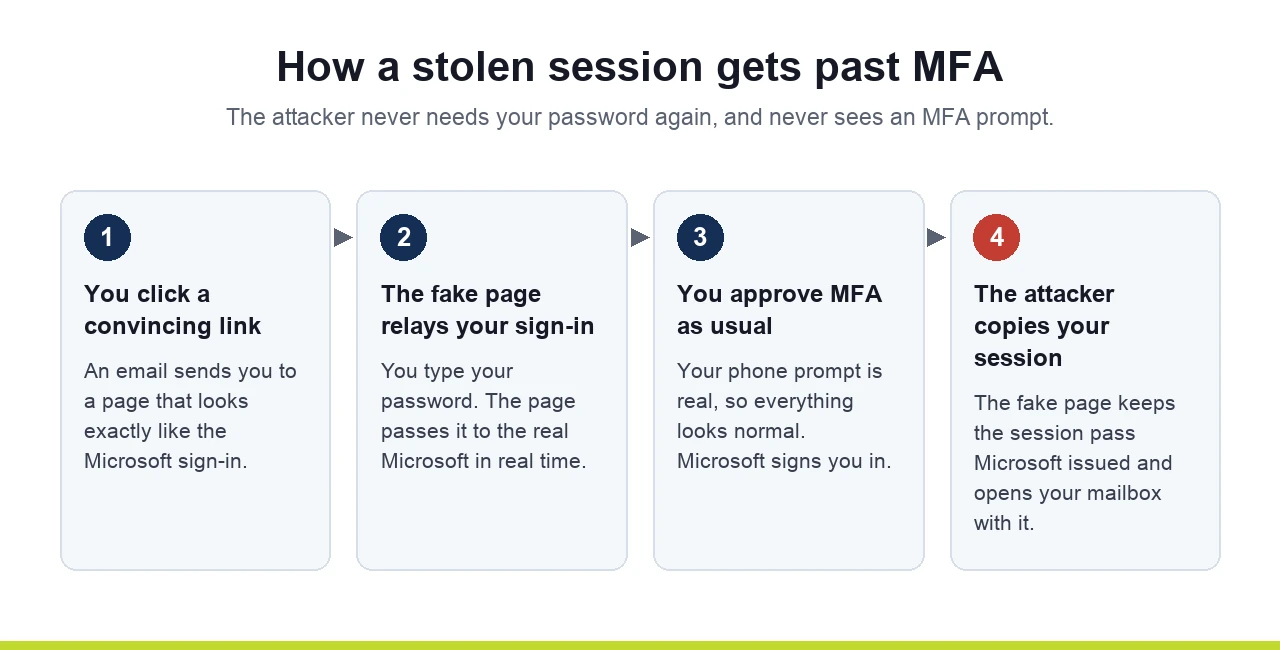
This is the most common MFA bypass today. It's called an adversary-in-the-middle attack. You click a link in a convincing email and land on what looks exactly like the Microsoft sign-in page. It's a relay. You type your password, approve the MFA prompt on your phone, and the real Microsoft signs you in. The fake page sits in the middle and copies your session token on the way through.
Now the attacker has a valid pass. They don't need your password again and they never see an MFA prompt. We've seen stolen sessions used from the other side of the world within hours of the real user signing in from their desk.
Once inside, a smart attacker makes sure they can come back. They open your security settings, remove your MFA methods, and register their own authenticator app. From then on, your account's "second factor" is a phone in someone else's pocket. Changing your password won't lock them out, because they can approve the reset.
Inbox rules are the quietest part of these attacks, and the part that costs money. We regularly find rules like these on compromised accounts:
The attacker reads your conversations for a few weeks, learns how your invoices work, and then sends one well-timed message from your real address.
This one surprises owners the most. In assessments of new clients, we often find MFA that's set up but not switched on: users enrolled but the policy disabled, or a Conditional Access policy left in "report-only" mode that watches sign-ins and blocks nothing. Sometimes it covers one person. Everyone believes they're protected because they remember setting it up once.
None of these fixes are exotic. They're settings and habits that most small business tenants have never had someone turn on.
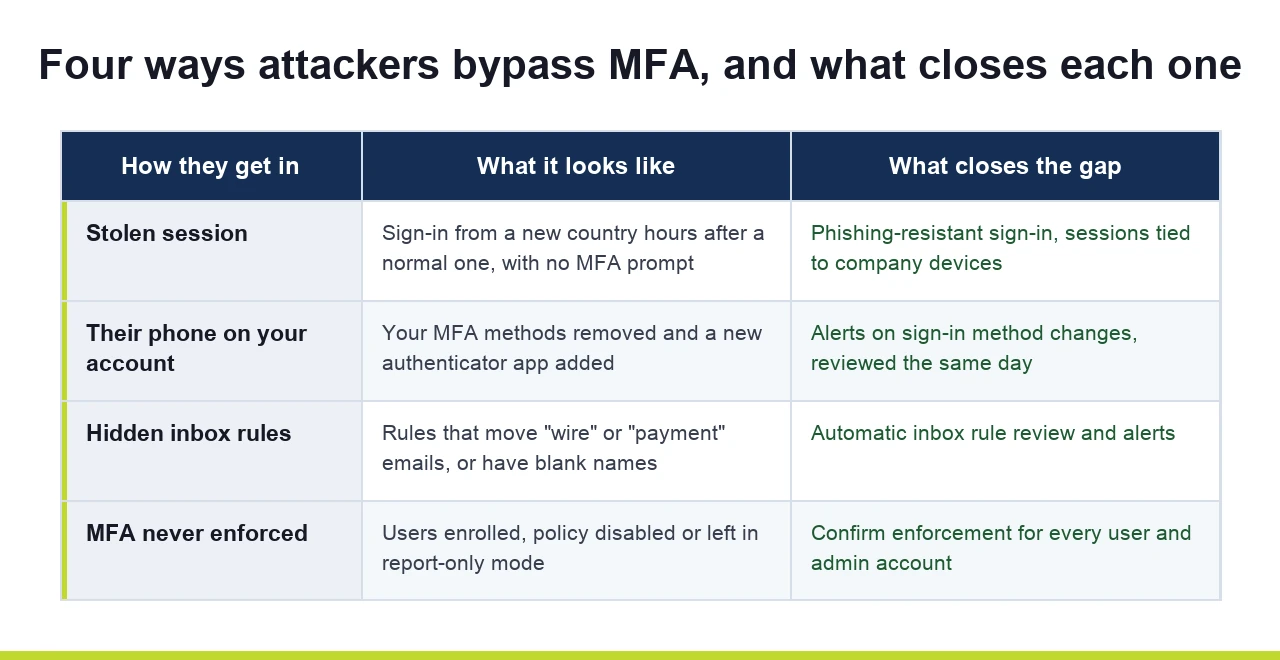
Confirm MFA is enforced for everyone. Not enrolled, enforced. Every user, every admin account, every shared login that can sign in. If you don't know how to check this, that's a sign it hasn't been checked.
Use phishing-resistant sign-in where you can. Passkeys, Windows Hello for Business and hardware security keys don't work on a fake sign-in page, because they're tied to the real Microsoft address. Start with owners, finance staff and anyone who can approve payments.
Bind sessions to known devices. Microsoft 365 can require that sign-ins come from company-managed devices, and its token protection feature ties a session to the computer that created it. A stolen session then won't work from someone else's laptop. These are Conditional Access settings, and they need to be planned and tested before they're enforced.
Watch for changes to sign-in methods. A new authenticator added to an account, especially right after a sign-in from an unfamiliar location, should raise an alert someone looks at the same day.
Review inbox rules. Rules that forward mail outside the company, move financial keywords, or have blank or nonsense names are red flags. Someone should be checking for them automatically, not once a year.
Verify payment changes by phone. Any request to change bank details gets a call to a number you already have on file. Never the number in the email.
Cyber insurance applications now ask detailed questions about MFA, and carriers check the answers after a claim. If your application says MFA is enforced on email and remote access, and the claims investigator finds a policy in report-only mode, that's a problem nobody wants to discover after a wire goes out.
The attacks above also don't trip your antivirus. Nothing malicious ever runs on a computer. Everything happens in Microsoft 365 with valid credentials, which is why so many of these go unnoticed for weeks.
None of this is unique to Microsoft. A fake sign-in page can relay a Google login and copy the session just as easily, and attackers hide in Gmail with filters and forwarding addresses the same way they use Outlook inbox rules. The fixes carry over:
This is what identity threat detection and response (ITDR) is for. On our managed clients, we monitor Microsoft 365 for the signs above: stolen sessions being replayed, new authenticators added, suspicious inbox rules, and sign-ins from places your team has never been. When something fires, an engineer isolates the account, kills the session and cleans up the rules, usually before the attacker has finished reading the inbox.
We also check that MFA is enforced, not just enrolled, as part of every new client's onboarding. More on the basics in our guides to what MFA is and how it works and why MFA matters for business security.
If you'd like a straight answer on whether MFA is enforced across your company and whether anyone would notice a stolen session, book a 15-minute call with our team. No pitch, just a look at where you stand.
Tell us a little about your business and we will get you booked in.