
Contact Us
Oct 24, 2023

Effortless Note-Taking with Microsoft's Transcript Feature


Bucharest, Romania - June 04, 2022: View of Microsoft Romania headquarters in City Gate Towers situated in Free Press Square, in Bucharest, Romania.

Virtual meetings have revolutionized how we communicate and collaborate with colleagues. They serve as a powerful tool for connecting with team members, sharing ideas, and conducting various business activities. Whether it's daily huddles to stay in sync, engaging presentations, or any other form of interaction, virtual meetings have become indispensable to workplace communication, enabling us to bridge distances and foster collaboration like never before.

For important information we hear in these meetings, sometimes it may be hard to write notes on precisely what was said. Maybe you have to write a report on what occurred during the session. Taking detailed notes is essential, ensuring accurate documentation and critical takeaways and discussions in the meeting.

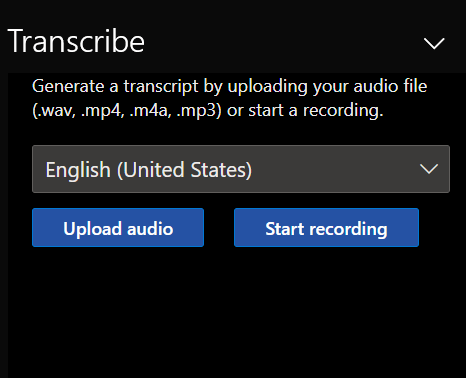
Therefore, SafePoint IT would like to inform you all of an easier way to take notes; this is through Microsoft's feature, where you are to transcribe all of your recordings. This feature will convert the speech of the recordings into text, with each speaker individually separated.
Additional Features

  • Users can convert audio recordings and record directly in a Word document.
  • Users can revisit parts of the video by playing back the timestamped audio.
  • Users can edit the transcript and save it as a Word document.

How to Record with Word Document

  1. Make sure you are logged in to your Microsoft Office 365 account.
  2. Go to Microsoft Word.
  3. In the left-hand corner, click the 'home' tab.
  4. Click on the microphone icon labeled "dictate."
  5. You will then have the option to transcribe by inputting an audio recording, or you can record whatever audio is directly playing on your device.

Overall, Microsoft's transcription feature makes your work process easier in obtaining important information without missing important details from your meetings. If you have any questions, feel free to contact us!

For more information, check out Support Microsoft.

Also, check out our "Tips and Tricks" on our website!
Technology Insights

Maintenance graphic sign of wrench and screwdriver tools.

Insider Tips for Choosing Small Business IT Support Services That Actually Help

Your time is valuable, and sifting through IT providers who overpromise and underdeliver is a...
Read More
moody computer room with man sitting at desk

Microsoft Copilot Cowork Explained: The Future of Work in Microsoft Teams

Microsoft just released something that changes how work actually gets done, and if you lead...
Read More
IT support for nonprofits specialists working in an office.

How IT Support Helps Nonprofits Protect Donor Data

Data isn’t just a line item on your balance sheet, but the foundation of donor...
Read More
chevron-down linkedin facebook pinterest youtube rss twitter instagram facebook-blank rss-blank linkedin-blank pinterest youtube twitter instagram