

SafePoint IT Named to the 2026 Inc. 5000 List
SafePoint IT has been named to the 2026 Inc. 5000 list, the annual ranking of...
Microsoft just released something that changes how work actually gets done, and if you lead a business, this matters more than the usual tech news cycle. Business owners, CEOs, and IT directors have spent years chasing operational excellence through better tools. Microsoft Copilot Cowork represents something rarer.
That’s a genuine competitive advantage hidden inside software you already use. We’ll share the latest news on Microsoft’s shiny new toy that will give you an edge over competitors.

Last week, Microsoft pulled the cover off what it calls its most ambitious AI project to date. Forgetting the incremental upgrades of the past, the company unveiled Microsoft 365 E7, a new premium tier priced aggressively at $99 per user per month. While the bundle includes the familiar suite of productivity tools, the headliner is Copilot Cowork.
Traditional Copilot features have been largely reactive—you ask a question, it gives an answer. However, Copilot Cowork is agentic. It is designed to plan and execute multi-step tasks across your digital estate without you holding its hand.
In a strategic move that underscores the fluidity of AI development, Microsoft integrated technology from Anthropic’s Claude into this feature. This signals a multi-model approach where the best model is used for the specific task at hand.
Imagine walking into your office and telling a junior associate, "Clear my calendar for deep work this week and prepare the briefing docs for the Smith acquisition."
That associate would hustle between Outlook, Teams channels, and the file server to get it done. Now, that associate is digital.
Copilot Cowork:
That’s all after seeking your final approval to ensure compliance. Therefore, it moves from being a tool to being a colleague. Think of it as integrating automation without losing the human touch.
Currently, Copilot Cowork is rolling out to the Frontier program with broader access expected later in March 2026. This feature is poised to redefine the architecture of the enterprise workflow.
For the operations director drowning in the friction of coordination or the revenue leader chasing the next deal, this development is the closest thing to a force multiplier we’ve seen in decades. The best way to use Teams has always been about centralizing communication, but Copilot Cowork transforms it from a communication hub into a command center.
Let’s explore the importance of Copilot Cowork for using Microsoft Teams effectively in greater detail:
Every organization suffers from what economists call "structural drag"—the hours lost to scheduling, note-taking, and follow-up emails. Copilot Cowork eliminates this tax entirely.
When your digital agent attends meetings, captures decisions, and distributes action items automatically, your human talent finally focuses on what you actually pay them for: judgment, creativity, and relationship building. It's part of a bigger shift toward AI working directly inside your business tools via MCP servers.
You’ll find that reclaiming just five hours per week per knowledge worker transforms your effective headcount without hiring a single person.
Global teams have always struggled with the handoff problem. A London team finishes their day, and the Seattle team starts cold. Using Microsoft Teams effectively now means your institutional memory travels with the work.
Copilot Cowork summarizes not just documents, but the context behind decisions—the Slack debate, the Teams hallway chat, the last-minute email clarification. For instance, your Singapore team arrives to a complete briefing rather than a blank inbox. This is continuity of thought, preserved and portable across time zones.
We've all sat through the meeting that should have been an email. Now, the economics of that hour become brutally transparent. Copilot Cowork tracks:
For the first time, you can quantify whether that weekly operations review actually moves the needle or merely consumes oxygen. Leaders who understand how to use Microsoft Teams effectively will treat meetings as capital expenditures—investments that must deliver measurable returns, not just calendar filler.
Sales cycles live and die on response time. When a prospect asks a technical question, the old model meant your account executive emailed engineering, waited for a reply, then forwarded the answer.
Copilot Cowork collapses that cycle because it scans:
All of this is used to draft the response instantly. Therefore, your revenue team stops being message couriers and starts being strategic advisors. Deals move faster because information moves instantly.

Any technological leap of this magnitude arrives with baggage that demands honest assessment. Before you authorize those E7 licenses, a clear-eyed look at the exposure, the human factors, and the actual economics will separate the organizations that thrive from those that merely spend.
Before celebrating the productivity gains, prudent executives must acknowledge the exposure this technology introduces. Copilot Cowork operates with broad permissions across your digital estate, and any misconfiguration can cascade into business consequences.
Understanding these risks isn't about fear-mongering—it's about intelligent deployment. Here are the top risks to consider:
Beyond immediate risks lie strategic considerations that determine whether this investment pays dividends or collects dust. The technology works, but human systems determine its effectiveness.
Organizations that succeed treat Copilot Cowork 365 as a change management initiative rather than a software procurement exercise.
At $99 per user monthly, Microsoft 365 E7 represents a premium over standard enterprise licensing. The price includes not just Microsoft Copilot Cowork but enhanced security features, advanced compliance tools, and priority support. However, the true cost extends beyond Microsoft's invoice.
You'll invest in training, governance restructuring, and potentially additional security monitoring tools. The organizations that extract value treat this as a capability investment rather than a feature purchase.
Calculate your break-even point based on hours reclaimed. If Managed Microsoft 365 Copilot saves each user just two hours monthly at a fully loaded cost of $75 per hour, the math works. Below that threshold, you're buying prestige rather than productivity. Approach the economics with the same rigor you'd apply to any capital expenditure.

So, how do you navigate this? How do you ensure that your organization finds the best way to use Teams with these new tools without stumbling into the pitfalls? It requires a shift in mindset from IT management to workforce orchestration.
Conduct a thorough audit of your current Microsoft 365 tenancy, which includes cleaning up your permission structures. Also, implement sensitivity labels and Data Loss Prevention (DLP) policies now, before the AI starts moving data around.
You wouldn't let a new executive start moving boxes in a cluttered warehouse without a map, so don't let your AI do it either.
Resist the urge to flip the switch for everyone. Instead, identify specific personas where the ROI is most tangible. For example, start with your sales team. Can Copilot Cowork shave 15% off their forecast time?
For your finance team, ask if it shortens reporting cycles? By targeting high-value use cases first, you build a business case and a success story that drives organic adoption.
This is where the magic either happens, and it’s known as gamifying the adoption. For instance, create internal "Copilot Cups" where teams compete to find the most innovative prompts.
Furthermore, it’s a good idea to establish a Center of Excellence—a living wiki of prompts and use cases specific to your business language. The goal is to move users from passive consumers of the tool to active conductors of the AI orchestra.
Here’s a table that highlights the differences at a glance:
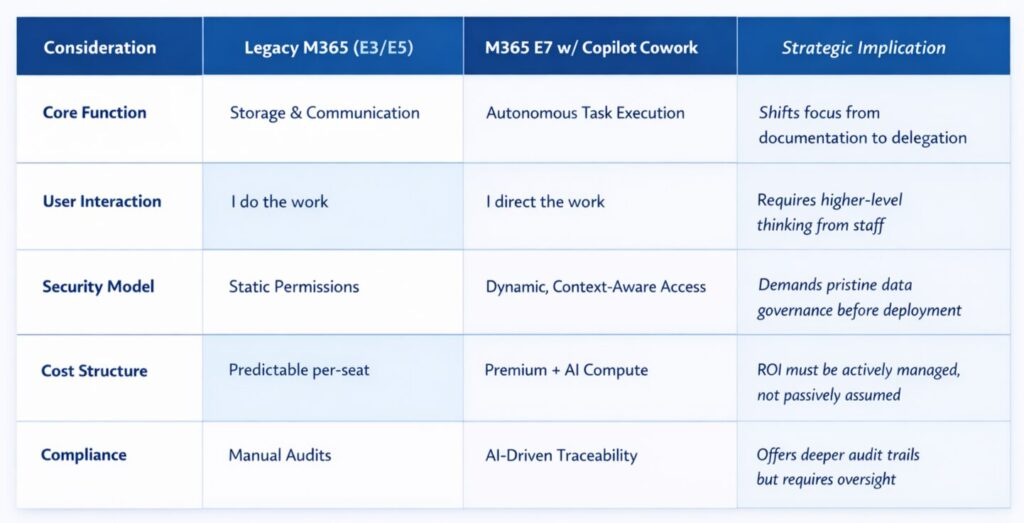
The arrival of Copilot Cowork marks a definitive end to the era of "digital transformation" as a buzzword and the beginning of intelligent operations as a reality. For the IT Director, it offers a path to offload the ticket-clogging minutiae. For the CEO, it offers a lever to pull that can extract hidden capacity from existing teams.
But technology is only ever half the battle. The winning organizations will be those that treat this as a strategic initiative. They will be the ones who look at Microsoft Teams not just as a place to chat, but as a headquarters for a hybrid human-AI workforce.
As your dedicated IT strategy partners, our role is to ensure that when you hand over the keys to your new digital co-worker, you’re not just hoping for the best—you’re architecting for it.
Do you want support with your Microsoft Copilot Cowork integration? Then contact SafePoint IT to get started.