

On Thursday, November 12, a little after 10 AM Central, Outlook stopped working for a large share of Microsoft 365 users around the world. For most businesses it stayed broken until the next morning. Microsoft's own incident record puts the outage at just under 24 hours, from 10:20 AM Central on Thursday to 10:10 AM Central on Friday.
A lot of people assumed it was a cyberattack. It wasn't. Microsoft has now published its post-incident reports, and one of its executives posted a summary of what went wrong. The short version is that three ordinary problems lined up at the worst possible moment.
Here is what happened, in plain English, and what it means for a small business that runs on Microsoft 365.
What broke
Every time someone opens Outlook, the connection first goes through Microsoft's network gateways. Think of them as the front doors to Microsoft's data centers. Your mailbox sits behind them. When the doors jam, the mail is still there, but nobody can get to it.
On November 12, most of those doors jammed at once. At the low point, Microsoft says more than 80% of the gateway servers had stopped responding. Exchange Online took the main hit, which is why Outlook went down. Teams, SharePoint and OneDrive were affected too, but less. Microsoft says Teams chats and meetings worked for most people for most of the outage.
Three problems that lined up
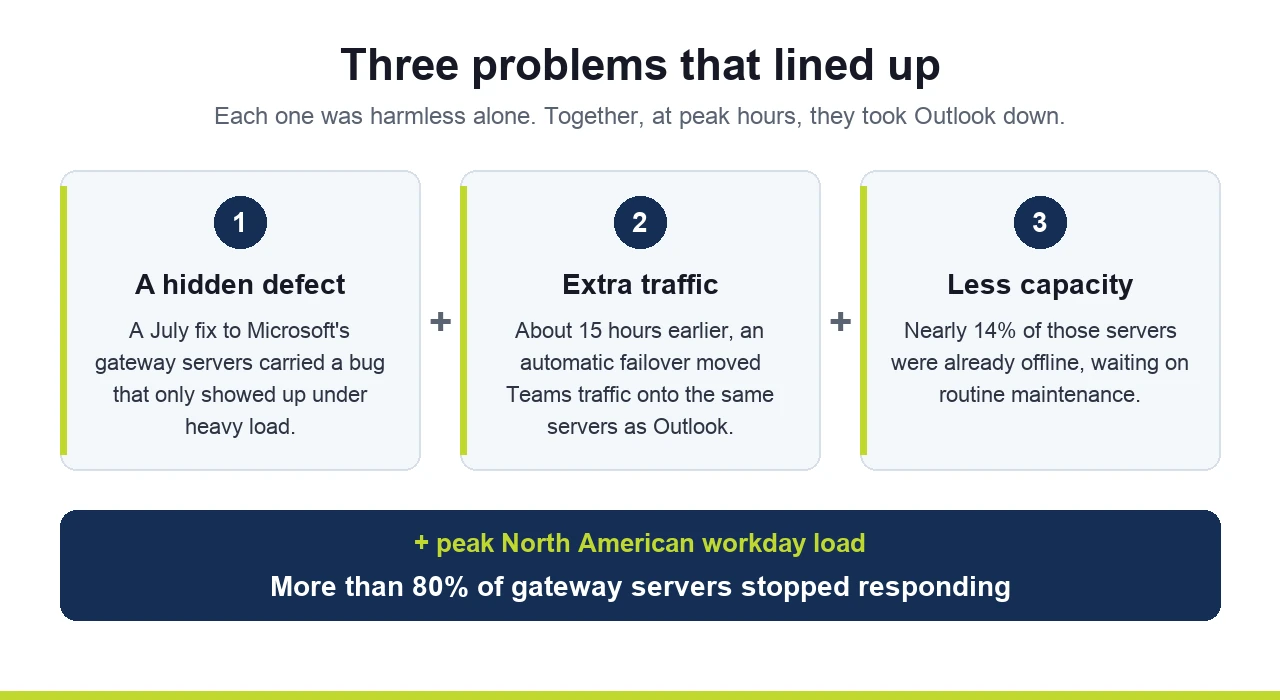
1. A hidden defect from July. In July, Microsoft rolled out a fix to its gateway servers. It contained a defect nobody caught. It ran for more than three months without causing trouble, because it only showed up when a server was under very heavy load. Microsoft says its load testing missed it, partly because the lab traffic didn't match real traffic and newer, more powerful servers were hit hardest. This was specific to Microsoft's own gateway servers. It has nothing to do with the Windows computers in your office.
2. Extra traffic landed on the same servers. About 15 hours before the outage, an automatic failover moved Teams traffic onto the same gateways that carry Outlook. That is the system doing what it was built to do. But it meant those servers were busier than usual going into Thursday.
3. Some servers were already out. Nearly 14% of the gateway capacity was offline at the time, waiting to come back through routine maintenance.
Put those together, add the busiest hours of the North American workday, and the hidden defect finally kicked in. Servers locked up, their traffic moved to the servers still standing, those overloaded too, and the failure spread from region to region.
Why it took a day to fix
This is the part every IT person reading the report winced at.
As soon as Microsoft brought a server back, every Outlook and phone that had been waiting to reconnect hit it at the same time, and it went down again. Microsoft's updates during the outage say exactly that: servers came back healthy, then stopped responding once traffic returned.
The usual undo button didn't help either. Microsoft normally rolls back a bad change in minutes. This change was months old and already everywhere, so there was no quick way to reverse it. Engineers ended up taking servers out of service in groups, restarting them, applying the fix, restarting them again and putting them back, region by region. The fix started rolling out around 1:20 AM Central on Friday, and service came back through Asia, then Europe, then North America over the morning.
Was it a cyberattack?
No. Microsoft said repeatedly during the outage that it saw no evidence of malicious activity, and the post-incident reports describe a technical failure. It landed in a week when several other big systems also had outages, which is why so many people jumped to conclusions.
Was any email lost?
For business mailboxes, Microsoft says no. Mail was queued, not deleted, and Microsoft stretched the window for delivering delayed mail from 24 to 48 hours so messages wouldn't bounce while it recovered. Many people got a flood of delayed email on Friday morning. That was the backlog catching up.
What Microsoft says it will change
Microsoft lists more than a dozen fixes. The ones that matter most, in plain terms:
- Keep a failure in one region from spreading to the others.
- Fail Teams over only in the region with the problem, not worldwide.
- Spot lost capacity before the spare runs out.
- Let recovering servers take traffic back gradually instead of all at once.
- Test on the newest, most powerful hardware at peak load.
Microsoft has dated the first of these for the end of 2026 and the rest for early 2027.
What a small business should take from this
Microsoft 365 is still one of the most reliable systems a business can run on. But "in the cloud" never meant "never down." The question is what your office does for the 24 hours when it is.
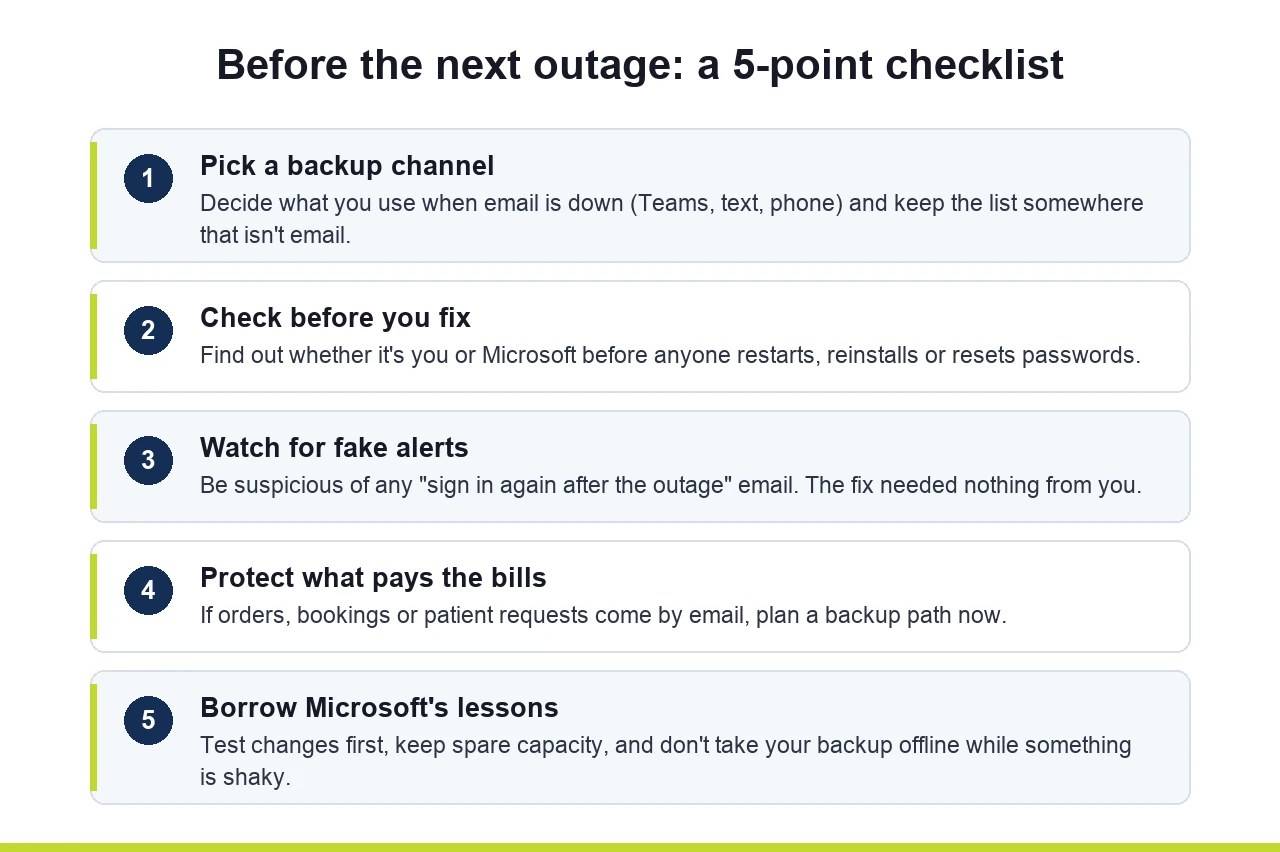
Know how you'll talk to each other. When Outlook went down, Teams mostly kept working. That only helps if people know to switch. Decide now what you use when email is down, whether that's Teams, text or a phone tree, and make sure everyone has the list somewhere that isn't email.
Know where to look before you start fixing. During an outage like this one, restarting computers, reinstalling Outlook or resetting passwords does nothing except add work. Check whether it's you or Microsoft first. Our clients get plain-language updates on our status page, and anyone can subscribe there to get them by email or text.
Be extra careful with email the week after. Big outages are a gift to scammers. A fake "Microsoft outage, please sign in again" email looks very believable right after a real one. The fix was entirely on Microsoft's side, and nobody needed to reset a password because of it. Treat any message that says otherwise as suspicious (more on that in how attackers get past MFA in Microsoft 365).
Plan for the important stuff. If a day without email would really hurt, say you take orders, bookings or patient requests by email, it's worth talking about a backup path for those messages before the next outage, not during it. We wrote about the same idea after the AWS outage last year.
The lessons Microsoft learned apply to a 20-person office too. Test changes before they go everywhere. Don't take your backup offline for maintenance at the same time something else is shaky. Leave yourself spare capacity. These are the same habits that keep a small network running, just at a smaller scale.
How we handled it
When the outage started on Thursday, we posted on our status page and kept updating it until Microsoft closed the incident Friday night, eleven updates in all. Each one said, in plain language, what was working, what wasn't and whether there was anything our clients needed to do. For almost the whole outage, there wasn't. The fix was on Microsoft's side.
If you'd like to talk through what a day without email would cost your business and what a backup plan could look like, book a 15-minute call.
Frequently Asked Questions
What caused the Microsoft 365 outage on November 12, 2026?
How long was Microsoft 365 down?
Was the Microsoft 365 outage a cyberattack?
Did I lose any email during the outage?
Did the outage affect Windows computers?
Start with a 15-minute call
Tell us a little about your business and we will get you booked in.

Managed IT, cybersecurity and AI for Chicagoland businesses of 10 to 100 people since 2002. Inc. 5000 in 2023, 2025 and 2026. How we work →